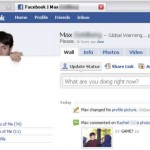
facebook profile popup 5 How to Make Your Facebook Picture Popup

There are times when you would get tired of all those boring smiling pictures that you and your friends would put up on Facebook. It just gets too monotonous! Well, you do not have to fret anymore and here is a novel way where you could make your picture appear to popup in your profile.

It doesn’t take a great Photoshop pro to get this don, and you could do it yourself. All you would need to make your profile picture a little funky is gather a camera or a picture which you already have, image editing software like Photoshop or GIMP or even Paint, and of course, the attached picture.

However, the success of your profile picture popping out depends on how you take the image in the first place. You would need to pick a picture that makes you look like you are peeking out from the white part, so as to match Facebook interface. If you can’t figure how to do it, just get a white cardboard and get your photo clicked. You can now use one of the image editing software mentioned above and cut out your face and hands, and discard all the background.

facebook profile popup 41 How to Make Your Facebook Picture Popup

Now you would need to paste your picture on the background image above and make sure you do not alter the image size as it would look weird on Facebook. Once you have pasted your cut-out picture on the background, you would have a seamless transparent image that would make your profile look totally cool.

Facebook may change its interface often, and make your new Popup Profile Picture look weirder than hell, but Max at Instructables promises to update the background image according to the changes made to the Interface of Facebook. Meanwhile, you could learn How to Make Your Facebook Profile Picture Bigger and look outstanding, literally, do the Facebook prank of the ugliest profile or even make your own set of Facebook Business Cards.

Related Posts From The Web


Amazing Tokyoflash Cool & Unique Japanese Watches
Gadget Tip of The Day!


Cool Tech Related Videos


If you enjoyed this post you can - Subscribe Now to the Free Newsletter


Related Tags: , , , , , , , , , ,

5 Responses to “How to Make Your Facebook Picture Popup”

  1. How to Make ‘Kilroy’-Style Facebook Profile Photos Says:

    [...] been known to change its layout more often than it changes its underwear. [From: Instructables Via: Walyou] [...]

  2. shamya Says:

    wat up shorty

  3. “Facebook’o” profilio nuotrauka « Social Media Says:

    [...] Ta?iau tai dar ne viskas – su didesniu profilio paveiksl?siu mes pasieksime geresni? rezultat? reklamuojant savo puslap?. Tiesiog tapsime didesni ir labiau pastebimi. Tapsime kitokie nei daugelis puslapi?, kuomet: pateiksime informacij? ant vartotoj? sienos, pasirodysime tarp “Facebook” paieškos variklio rezultat? arba si?lym? draugams prisijungti prie J?s? sukurto puslapio rezultat?. Apibendrinant galima teigti, kad ?ia galioje elementar?s gamtos d?snis – didesnis tampa labiau pastebimas ir turi daugiau galimybi? pritraukti ? savo pus? daugiau gerb?j?:) ApieVestuves.lt Na ir pabaigai viena iš daugelio id?j?, kaip, pasitelkus fantazij? galima originaliai prisistatyti “Facebooko” puslapiuose. Kaip sakoma – “think out of the box”. Kaip pasigaminti tok? paveiksl?l?, galite pasiskaityti ?ia [...]

  4. Facebook Fan Check App Virus Warning | Walyou Says:

    [...] other Facebook related information, but in a safer and happier sense, check out how to make your Facebook Profile Picture pop out, the hillarious Ugliest Facebook Profile Prank or How To Make Facebook Profile Pictures [...]

  5. Nate Says:

    Hey. check the SocialPic! it helps you to make unique profile picture for facebook

Leave a Reply